
 COLIPSO AIDR
Privileged access, controlled at every threshold.
Cardea PAM is a privileged access management platform for the accounts that run your infrastructure. It keeps administrator, root and service credentials in a central vault, decides which people may use which accounts on which systems, and records the activity of every privileged session — so administrators can do their work without ever holding the keys.
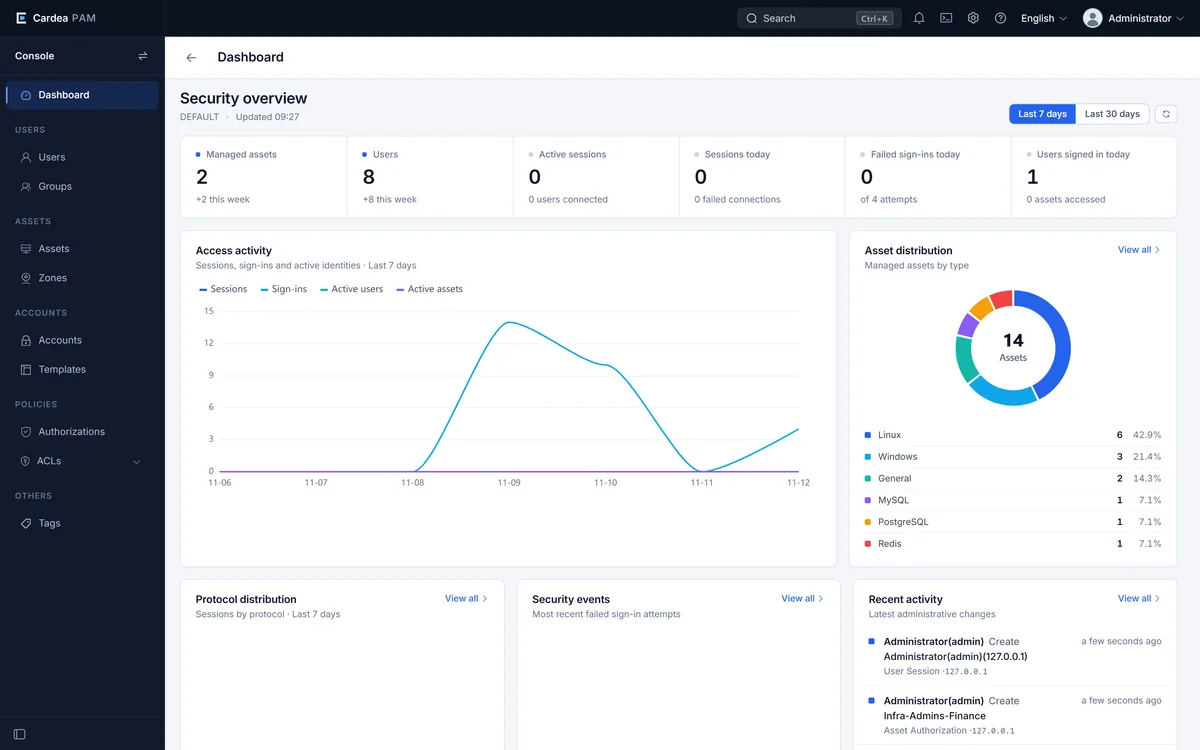
Screenshot of the Cardea PAM console, test environment with sample data.
Every privileged account in one vault, under one set of rules
Root passwords in spreadsheets, shared Administrator logins and service accounts nobody owns are how attackers move from one compromised machine to the whole estate. Cardea PAM brings those accounts into a single inventory, stores their secrets encrypted, and makes every use of them deliberate and traceable.
- Inventory of hosts, network devices, databases, cloud platforms and web targets, organized in an asset tree.
- Privileged and standard accounts stored in an encrypted vault, with the secret masked in the console.
- Users connect through Cardea with the vaulted account instead of being given the password.
- Automation to test connectivity, discover, push, back up and change account secrets.
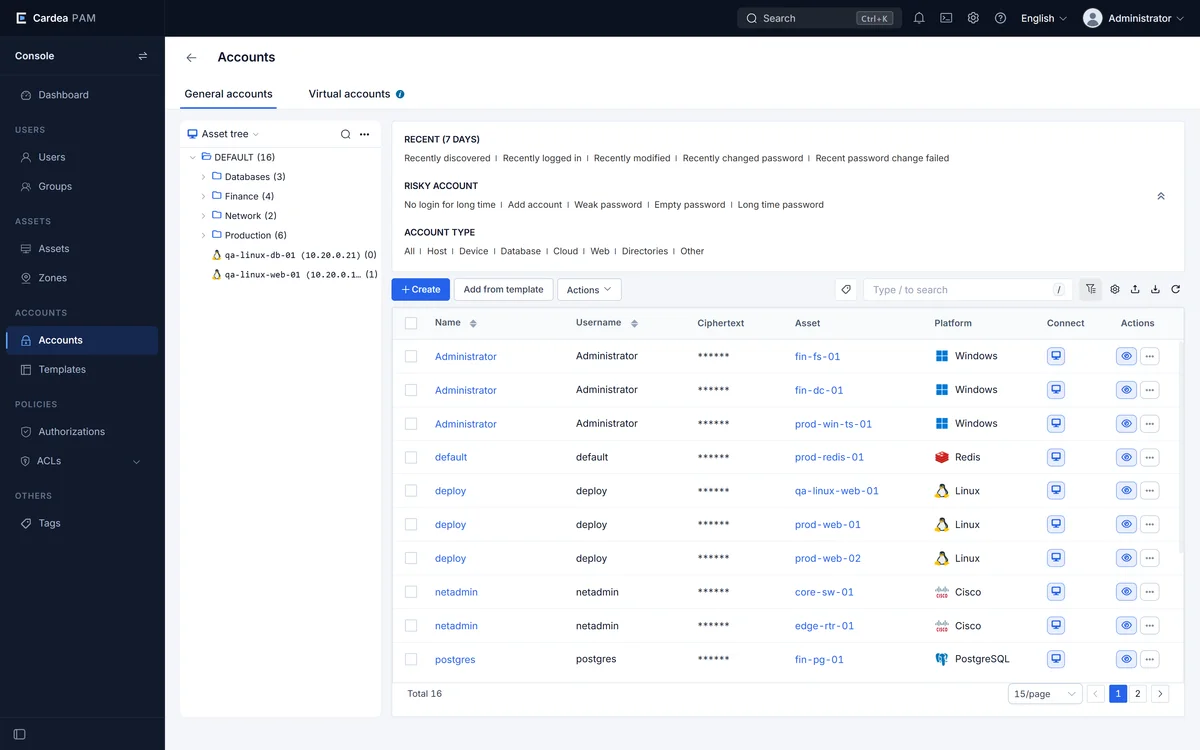
Cardea PAM account vault, test environment with sample data.
Everything needed to govern privileged access
Credential vault
Passwords and keys of privileged and service accounts are stored encrypted and shown masked. Account templates keep credentials consistent across systems.
Asset inventory
Hosts (Linux, Unix, Windows), network devices, databases, cloud and web targets in one inventory, grouped in a tree of nodes and zones.
Users & groups
Manage who may use Cardea PAM, organize them in groups and assign roles, with organizations to separate business units.
Authorizations
Grant users or groups access to specific assets and accounts, choose the permitted actions and set an expiry date.
Brokered connections
Open SSH, RDP and database sessions from the browser through Cardea, using the vaulted account rather than a password the user knows.
Session audit
Review online and historical sessions, the commands that were run and the account activity behind them.
Secret rotation
Change account secrets on a schedule or on demand, push accounts to systems and back up the vault.
Account discovery & risk detection
Discover accounts that exist on your systems and flag risky ones: weak, empty or long-unchanged passwords and accounts not used for a long time.
Access control lists
Restrict how and from where users may sign in and connect, and filter the commands that may run in a session.
Strong sign-in
Multi-factor authentication with one-time passwords and passkeys, and single sign-on through LDAP, OIDC, SAML 2.0, CAS, OAuth 2.0 or RADIUS.
Security overview
A dashboard of managed assets, users, active sessions, sign-ins and failed sign-ins, with access activity trends and recent administrative changes.
Application integration
Let applications and scripts retrieve the credentials they need through the API, instead of keeping them in configuration files.
From shared passwords to governed access in four steps
Onboard
Add servers, databases and network devices, and store their privileged accounts in the vault.
Authorize
Decide which users and groups may use which accounts on which assets, with what actions and until when.
Connect
Administrators open sessions through Cardea. The credential is used for them and never handed over.
Audit & rotate
Sessions and commands are recorded for review, and secrets are rotated so old passwords stop working.
Access is granted explicitly — and expires
An authorization in Cardea PAM names the users or groups, the assets or asset nodes, the accounts they may use and the actions they may take. Nothing is reachable unless an authorization allows it, and every authorization carries an expiry date.
- Grant by user group and asset node, so new servers inherit the right access automatically.
- Allow all accounts on an asset or only specific ones, such as Administrator or root.
- Control connect, upload, download, copy and paste per authorization.
- Quick filters show expired, disabled and invalid authorizations for review.
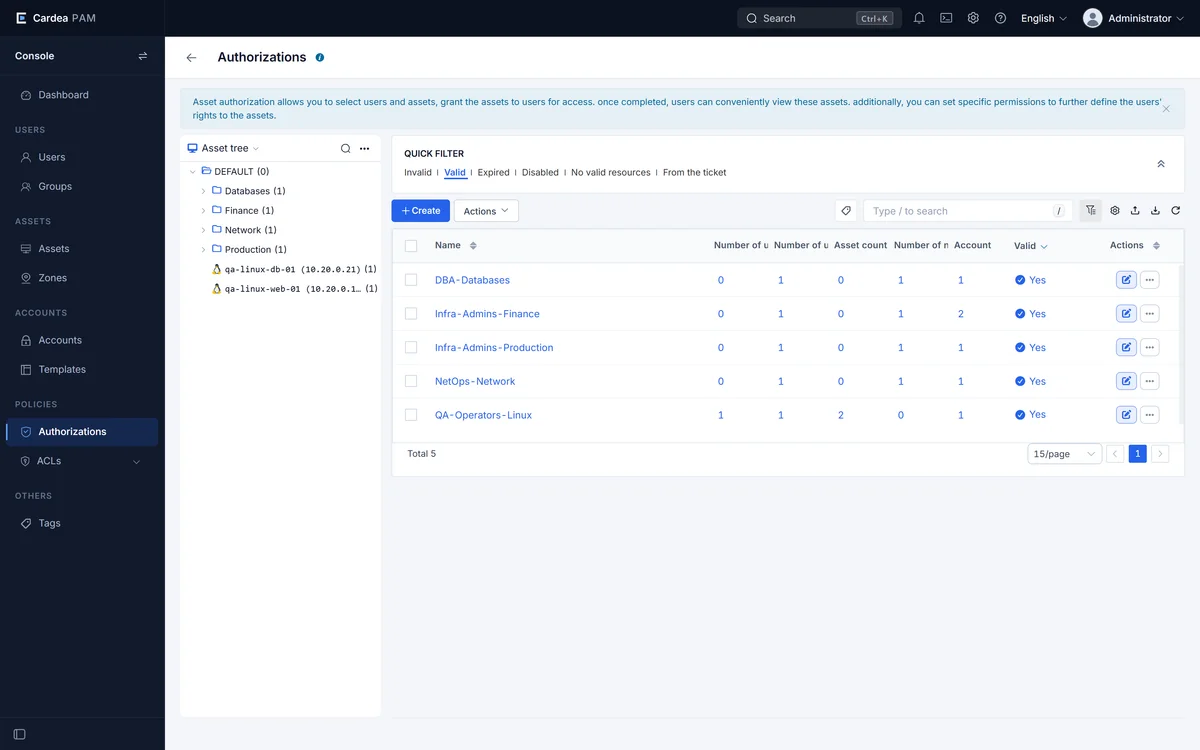
Cardea PAM authorizations, test environment with sample data.
Where Cardea PAM makes the difference
Secure administrator access
Vault domain, server, database and network administrator credentials and broker every privileged session through one controlled point.
Third-party and contractor access
Give vendors access to exactly the systems they support, for a fixed period, without sharing a password that outlives the contract.
Clean joiner, mover, leaver process
Access follows group membership. When someone leaves, removing the user ends their access — there is no shared password left to change everywhere.
Retire stale and weak credentials
Find accounts with weak or long-unchanged passwords and rotate them, so leaked credentials stop working.
Investigation evidence
Session and command records show who did what on a critical system, and when, for incident response.
Regulatory compliance
Demonstrate least-privilege access control, credential management and monitoring of privileged activity to regulators and auditors.
Administrators keep working. The keys stay in the vault.
Passwords handed out
Users connect with vaulted accounts instead of knowing them.
Inventory of privilege
Every privileged account, on every system, in one place.
Time-bound access
Every authorization ends on a date you choose.
Evidence on demand
Sessions, commands and sign-ins recorded for review.
Take the keys out of administrators’ hands
See Cardea PAM with your own servers, databases and network devices in a guided session with a Senthyrix solutions engineer.