
 COLIPSO AIDR
Your teams use the account. They never see the password.
Cardea Secure Web Access protects the corporate accounts your business runs on the web — Instagram, Facebook, LinkedIn and TikTok profiles, and any other web application you add by its URL. People open the account in an isolated, recorded browser session; the password is filled in from your vault and is never shown, copied or sent to them.
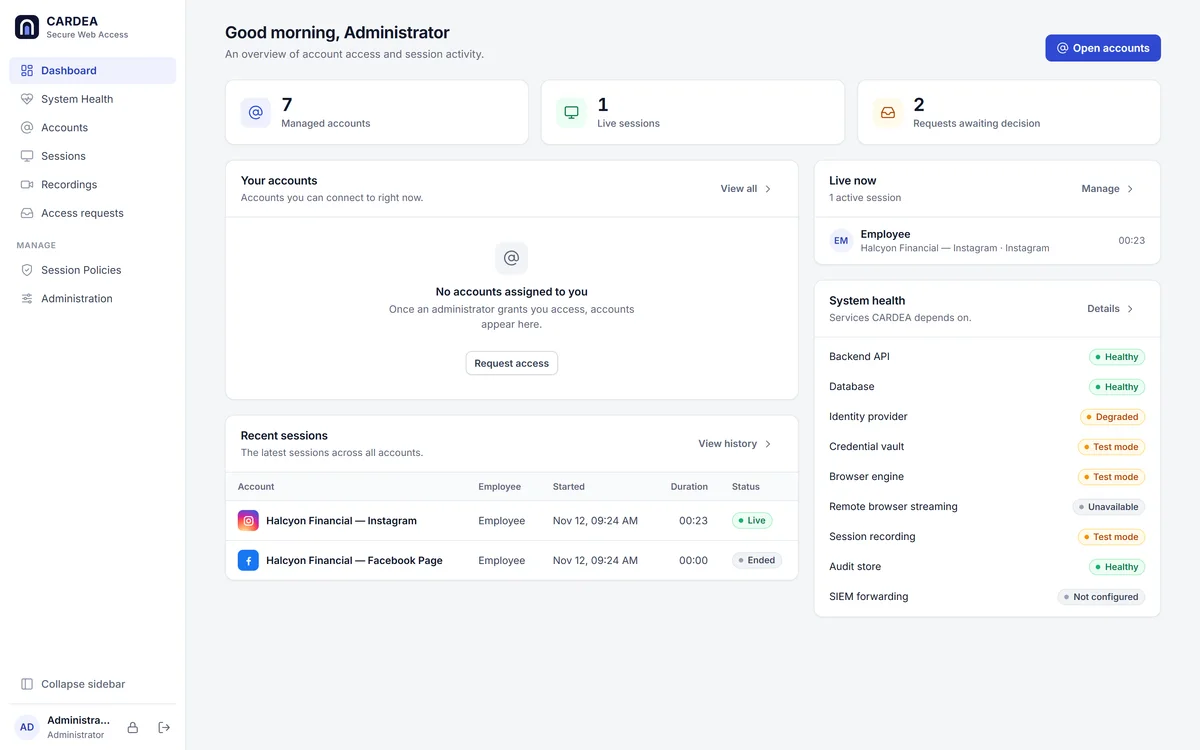
Screenshot of the Cardea Secure Web Access portal, development environment with sample data.
Replace the shared password with individual, governed access
Brand profiles and business web accounts are often protected by one password that marketing, communications, customer care and agencies all know. Anyone who leaves keeps it. Cardea Secure Web Access replaces that shared secret with access that is granted per person, per account, and can be withdrawn at any moment.
- Every grant is individual and time-bound: given directly by an administrator or through an approved request.
- Employees request access with a justification; approvers responsible for the account’s department decide.
- Revoking access ends that person’s live sessions on the account immediately.
- Periodic access reviews keep or revoke each grant, and every decision is audited.
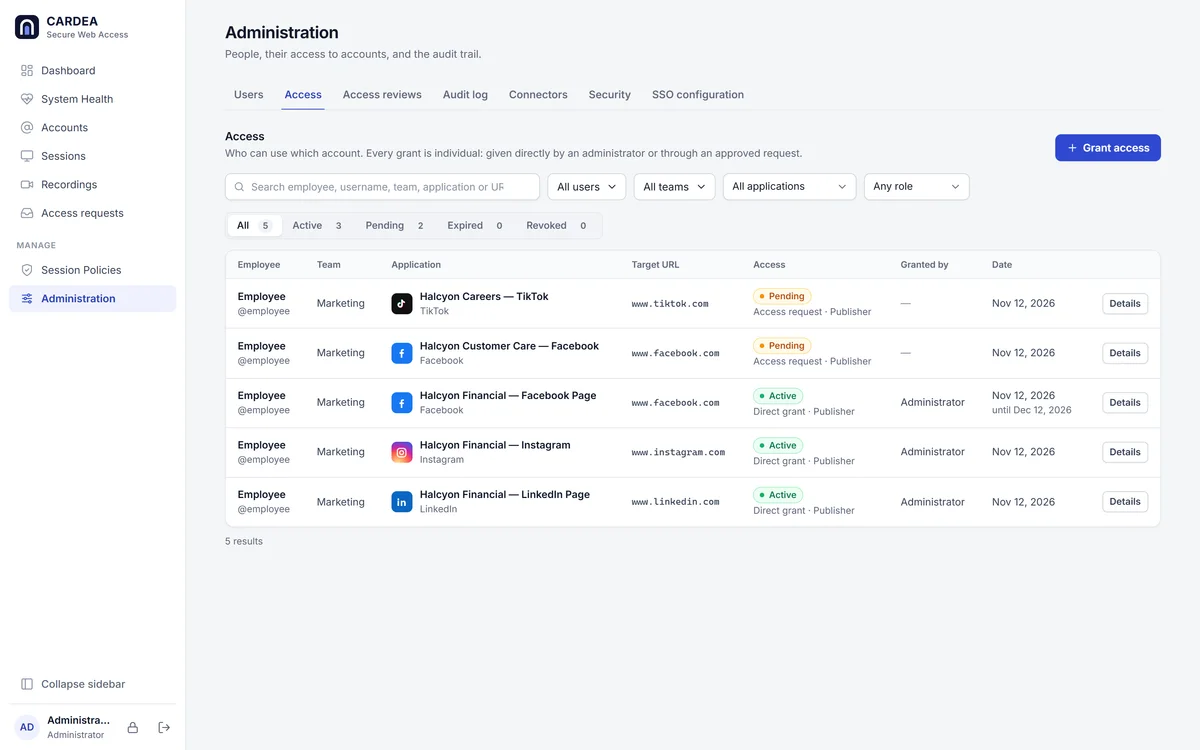
Cardea Secure Web Access access management, development environment with sample data.
Built for the accounts that carry your brand
Password-hidden access
The credential is typed into the sign-in page inside the remote browser. It never reaches the user’s device or the portal, and password reveal is off by default.
Social media & any web app
Built-in support for Instagram, Facebook, LinkedIn and TikTok, plus custom web applications added by their HTTPS address.
Isolated browser sessions
Each session runs in its own locked-down browser that is destroyed afterwards, so nothing — cookies, downloads, history — is left behind.
Access requests & approvals
Employees request access with a reason and a duration; approvers for the account’s department approve or reject it.
Time-bound grants & reviews
Grants expire automatically. Access reviews list grants due for a decision so they are kept or revoked deliberately.
Session policies
Idle timeout, maximum session length, concurrency, clipboard, downloads and uploads, and blocked pages — set per policy and per account.
Encrypted session recording
Sessions can be recorded per account. Recordings are encrypted, and playback requires a written justification and is itself audited.
Tamper-evident audit log
Every grant, session and administrative action is written to a hash-chained audit log that can be verified at any time.
Account takeover safeguards
Password-reset and account-settings pages are blocked inside sessions, and a rejected password locks the account and alerts security.
Separation of duties
Nobody can approve their own request, grant themselves access, change their own role or replay their own sessions.
Single sign-on & MFA
Sign in through your identity provider with OIDC, or use portal multi-factor authentication with authenticator apps.
SIEM forwarding
Forward audit events to your SIEM over syslog with TLS for correlation with the rest of your security monitoring.
From a shared password to a controlled session in four steps
Add the account
An administrator adds the account and stores its password in the vault inside your environment.
Grant access
Access is granted directly or through an approved request, for a fixed period, to named people only.
Connect
The user clicks Connect. An isolated browser opens the account and signs in with the vaulted password.
Record & review
The session follows its policy, can be ended by an administrator, and is recorded and audited.
Decide exactly what a session may do
Every account follows a session policy. Use the standard policy for everyday accounts and a strict one for the profiles that matter most — shorter sessions, a single concurrent session and longer recording retention.
- Idle timeout and maximum lifetime, measured inside the session itself.
- Concurrency limits per user and per account.
- Clipboard, downloads and uploads allowed or blocked.
- Blocked pages, such as password reset and account settings, to prevent takeover from inside a session.
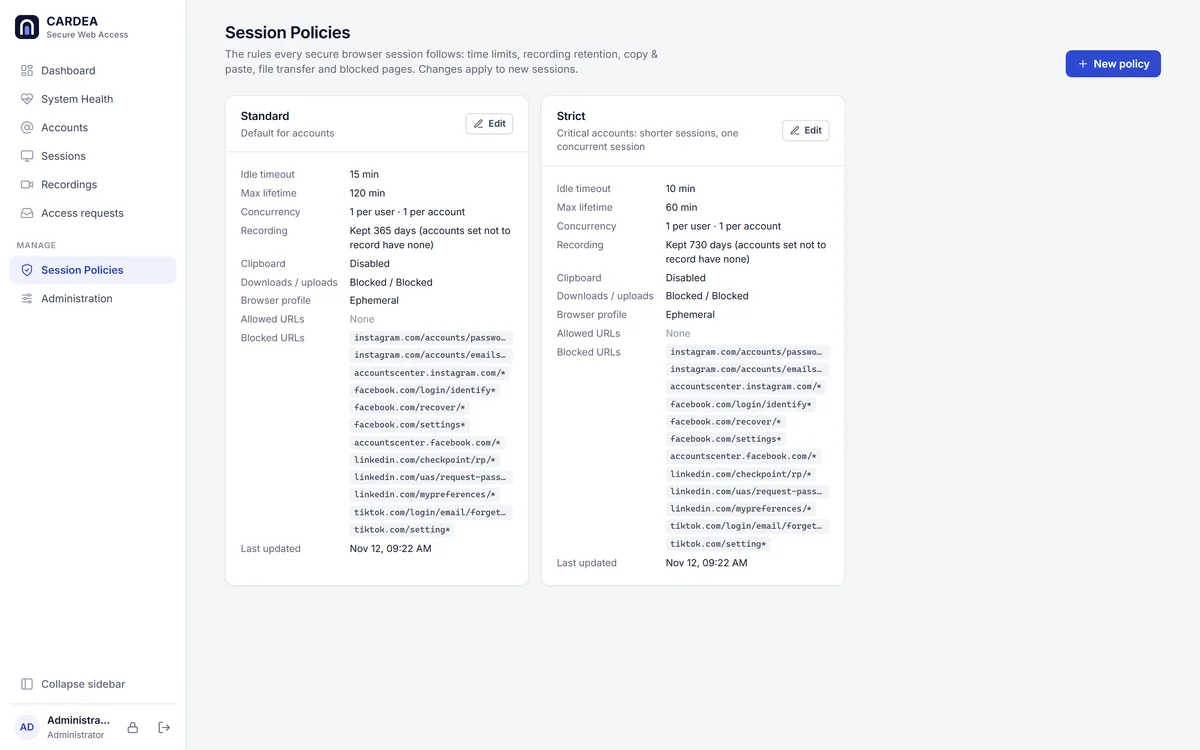
Cardea Secure Web Access session policies, development environment.
Your credentials and your screens stay on your site
Cardea Secure Web Access separates the portal people use from the components that touch sensitive data. The vault, the isolated browsers and the recordings run in your own environment; the portal only ever receives opaque references.
Vault on your premises
Account passwords are stored encrypted in a vault inside your environment and are released for a single session at a time.
Nothing sensitive leaves your site
Credentials, screen content, recordings, uploaded files and visited addresses are never sent to the portal’s control plane.
Outbound-only connector
Your site connects out to the control plane over mutually authenticated TLS and accepts only signed commands. The control plane never connects into your network.
Where Secure Web Access makes the difference
Protect brand & social accounts
Stop account takeovers caused by shared passwords. Teams publish and engage through Cardea without knowing the credentials.
Work safely with agencies
Give agency staff access to the specific accounts they manage, for the length of the engagement, and withdraw it instantly when it ends.
Clean offboarding
When someone leaves, there is no password to change on dozens of accounts — their access is simply removed.
Shared business web applications
Bring advertising platforms and other shared SaaS logins under the same control by adding them as custom web applications.
Accountability for every post
Recorded sessions and the audit trail show who used which account and when, for investigations and internal reviews.
Regulated organizations
Demonstrate individual accountability, least privilege and periodic access reviews for accounts that speak for your organization.
Access for the people who need it. The password for no one.
Passwords revealed
Credentials are filled in for users and never shown.
Individual grants
Access is given to named people, never to a shared login.
Time-bound by default
Grants end automatically and are reviewed periodically.
Tamper-evident trail
Every grant and session in a verifiable audit log.
Take passwords out of your teams’ hands
See Cardea Secure Web Access with your own social media and web accounts in a guided session with a Senthyrix solutions engineer.